Wild Canyon Font: A Bold Display Typeface for Web Designers
I was working on a product landing page for a small outdoor gear company when I stumbled across Wild Canyon. The brief called for a strong visual identity that conveyed adventure, ruggedness, and authenticity. As a web designer who’s always on the lookout for fonts that elevate brand storytelling, I knew I had to test this display font in context. Let me walk you through how it performed and why I’m now recommending it for similar projects.
Testing Wild Canyon in a Hero Section
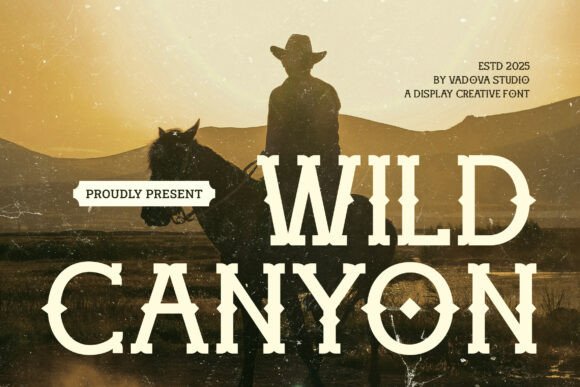
The first place I tried Wild Canyon was the hero headline of the landing page. It immediately stood out with its bold structure and sharp serifs — exactly the kind of character needed to make an impression at a glance. In contrast to more minimalist sans serif fonts, Wild Canyon brought a sense of energy and raw creativity to the layout.
On desktop, the font rendered cleanly even at smaller sizes, but it really came alive when scaled up. I paired it with a full-screen image of a mountain range and found that the letterform cuts gave the text just enough texture to cut through the background without overwhelming it. That’s rare for a display font, especially one with such a distinct personality.
Using Wild Canyon for Branding and Logo Text
A few days later, I was helping a client build their digital brand kit, and I decided to use Wild Canyon as the primary logo typeface. Its western-style roots lent a unique flavor to the brand identity — something both modern and timeless. I particularly liked how the alternates allowed for subtle variations in the logo design while maintaining consistency across all design assets.
When building a brand, typography plays a huge role in shaping perception. With Wild Canyon Fonts, the client was able to express confidence and individuality right from the homepage title. The font didn’t feel outdated or gimmicky; instead, it grounded the brand in a story that resonated with their target audience — adventurers and nature lovers.
Why Wild Canyon Works for Creative Portfolios
I also used Wild Canyon in a creative portfolio project for a graphic designer who wanted to showcase her love for vintage Americana. The font added a touch of personality to section headers and accent text. For body copy, I paired it with a clean sans serif, which balanced the display font's intensity and kept the site scannable.
What I appreciated most was how it helped establish visual hierarchy. By using Wild Canyon for titles and a lighter, neutral font for descriptions, the user could quickly navigate the content while still feeling immersed in the brand’s aesthetic.
Readability Tips for Mobile Screens
One concern with any decorative display font is readability on mobile devices. I tested Wild Canyon at 36px and found it legible across various screen sizes, thanks to its open apertures and high-contrast strokes. But I did notice that some users might find the sharper edges a bit too intense at smaller sizes, so I recommend reserving it for larger headers and avoiding it in navigation menus or short buttons.
- Use at 40px+ for headlines to maintain clarity.
- Keep spacing generous in responsive layouts to avoid crowding.
- Test against dark backgrounds for contrast balance — it works well if you’re not overdoing drop shadows.
Wild Canyon for Product Banners and Online Stores
Later, I applied Wild Canyon to a boutique online store redesign. The shop sold handmade leather goods and vintage-inspired accessories, so the font fit like a glove. I used it for category headers and sale banners, where it added a sense of craftsmanship and heritage.
It wasn’t perfect for every part of the site — I stuck to simpler sans serif options for pricing and product details — but in the right spots, Wild Canyon elevated the overall experience. Customers commented on how the site felt more curated and intentional after the update, which speaks volumes about the power of good typography in web design.
Font Pairing Suggestions for Wild Canyon
If you're considering Wild Canyon for your next project, here are a few pairing ideas that worked well during my tests:
- Wild Canyon + Open Sans: This combination brings out the best of both worlds — a premium display font with a modern, approachable sans serif.
- Wild Canyon + Lora: If you want a more editorial or blog-like feel, pair it with a soft serif for a cohesive, stylish look.
- Wild Canyon + Roboto Slab: Great for SaaS or course sales pages, where you want a bold header but need a clean supporting typeface.
Always ensure there's at least two levels of contrast between the display font and the secondary font. This helps guide the eye and makes the site easier to scan, especially on longer landing pages or blog posts.
Wild Canyon in Campaign Landing Pages and Social Media Graphics
I recently built a campaign landing page for a new podcast launch, and Wild Canyon was a natural choice for the main title. The bold structure made it pop in video thumbnails and social media graphics, where attention is fleeting and impact is key.
What impressed me was how versatile the font could be. One week it was featured on a high-energy Instagram ad with a neon backdrop. The next, it was subtly embedded into a newsletter banner with a muted tone. Either way, it maintained its visual strength and never lost its character.
When to Avoid Wild Canyon
Despite its strengths, Wild Canyon isn’t the ideal font for everything. Here are a few situations where it might not be the best fit:
- Long paragraphs or body text — it’s a display font, not meant for dense reading.
- Small buttons or form labels — the intricate details can become hard to read.
- High-speed scrolling content — sometimes the boldness feels jarring in fast-moving UIs.
Stick to using it for titles, logos, banners, and short call-to-action phrases. That’s where it shines.
Bringing Personality to Course Sales Pages and Blogs
Another project where I found Wild Canyon incredibly useful was a course sales page for a photography instructor. The font was used in the main headline and chapter titles, adding a sense of boldness and originality to the layout.
For the blog section, I used it sparingly in post titles and section headers. The result? A more engaging interface where readers could easily identify topics and sections. Just remember to check for multilingual support if your site targets international audiences — Wild Canyon covers a solid range of characters, but not all.
File Formats and Webfont Availability
Before implementing Wild Canyon into live sites, I always double-check the included file formats and webfont availability. Fortunately, this font comes in several weights and styles suitable for different platforms. Whether you're embedding it via CSS or integrating it into Adobe XD, Figma, or Canva, the flexibility is there.
Also, verify that the commercial font license allows for the specific usage — such as website headers, digital ads, or branded content. Many clients overlook this step, and it can lead to legal issues down the line.
Wild Canyon Adds Depth to Digital Brand Kits
As someone who builds brand kits for startups and small businesses, I often look for typefaces that reflect the brand’s core values. Wild Canyon has a certain gravitas — it doesn’t just say “look at me,” it says “this is who we are.”
In one case, I integrated it into a brand kit for a lifestyle coaching business. The client wanted to convey resilience and authenticity, and the font helped them do that effortlessly. When paired with appropriate colors and imagery, it became a cornerstone of the visual identity.
Fast-Loading Visual Content with Wild Canyon
Speed is crucial in web design, and I was curious whether using a decorative display font would affect load times. After running a few performance audits, I found that as long as you’re using optimized webfonts (like WOFF2), Wild Canyon doesn’t significantly slow down the page. Always prioritize loading the font asynchronously and limit the number of weights you include unless necessary.
For fast-loading visual content, consider using SVG or PNG versions for static headers, especially if you’re targeting older browsers or slower internet connections. But for most modern websites, Wild Canyon handles itself admirably.
Final Project Takeaways
After putting Wild Canyon through several real-world scenarios — from landing pages to brand kits — I’ve come away impressed. It’s not just another pretty font — it’s a tool that can shape how people perceive a brand. The bold structure, sharp serifs, and western flair give it a unique edge that many designers are looking for in today’s crowded digital space.
If you’re working on a project that needs a touch of grit, style, and memorability, I’d encourage you to give Wild Canyon a try. Just remember to use it wisely, pair it with complementary fonts, and always keep readability top of mind. It’s a display font that tells a story — and sometimes, that’s exactly what your design needs.