Xtrudo Font for Bold Digital Branding and Edgy Web Design
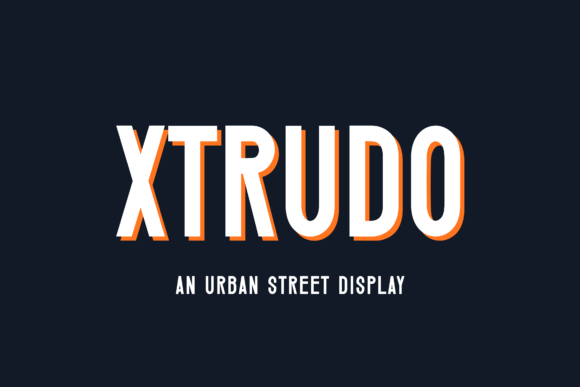
As a web designer working on a boutique streetwear brand's new landing page, I was looking for a font that could capture the essence of urban grit without sacrificing visual clarity. That’s when I stumbled upon Xtrudo, an edgy display font with a tall, condensed structure and raw energy that screams authenticity. In this article, I’ll walk through how I tested Xtrudo in real design scenarios and why it might be the perfect choice for your next digital project.
Testing Xtrudo in a Hero Section for Maximum Visual Impact
I first dropped Xtrudo into the hero section of a sample product landing page. The goal was to create urgency around a limited-edition drop. What immediately stood out was its ability to dominate the screen while still feeling cohesive with the rest of the layout. Its tall, condensed form made it ideal for short, punchy headlines like “Urban Edge. Limited Stock.” — something that wouldn’t work as well with a more traditional display font.
The font’s personality is unapologetically bold. It doesn’t whisper; it shouts. That makes it especially useful for brands targeting younger audiences or those who want to make a strong impression in the first few seconds of user interaction. But here’s the catch: because of its stylized nature, Xtrudo is best suited for large-scale headers rather than body text. I found that using it for subheadings or buttons could quickly lead to readability issues if not handled carefully.
Xtrudo for Logo Text and Branded Web Content
In another test, I used Xtrudo for a logo mockup for a fictional skateboarding gear startup. The font worked surprisingly well in a monochrome version over a dark background, giving the brand an instantly recognizable edge. For Fonts used in logos, you need something that stands out but also feels consistent across different platforms — and Xtrudo delivers.
When integrating Xtrudo into other branded web content like navigation menus or call-to-action areas, I had to be mindful of spacing and contrast. The condensed width helped keep layouts tight and focused, which is great for mobile-first designs where space is at a premium. However, I always paired it with a clean sans serif typeface for body copy to maintain legibility and balance.
How I Paired Xtrudo with Supporting Typography
- Headline: Xtrudo (for impact and visual hierarchy)
- Body Copy: Inter or Lato (for simplicity and clarity)
- Buttons: Same weight of Xtrudo, but slightly larger to ensure tappable area
This setup allowed me to highlight key messages while keeping the supporting text easy to read. It’s all about letting the Display font do the heavy lifting without overwhelming the interface.
Xtrudo Over Image Banners and Promotional Landing Pages
One of the strongest use cases I found for Xtrudo was overlaying it on image banners for promotional campaigns. The gritty texture and sharp angles of the font cut through busy visuals, making it perfect for headlines that need to stand out. On a campaign page for a music festival, I layered Xtrudo over a photo of a city skyline and it felt exactly like the kind of underground vibe the client was aiming for.
However, I noticed that at smaller sizes or lower resolutions, some of the finer details got lost. This is a common issue with decorative Fonts, so my advice is to use Xtrudo only in high-impact zones where users aren’t expected to scan for long periods. Stick it to hero sections, taglines, and featured titles — the places where you want to leave a lasting visual imprint.
Readability Tips When Using Xtrudo on Mobile Screens
Mobile responsiveness is crucial. While Xtrudo looks great on desktops, I had to increase the font size significantly on mobile devices to preserve its readability. A good rule of thumb is to use it at no less than 36px for headline purposes on smaller screens. Also, adding subtle padding and ensuring enough white space around the text helps prevent it from getting swallowed by the screen’s tighter dimensions.
For image overlays on mobile, I recommend testing the contrast against different background colors and images. Darker versions of Xtrudo tend to pop better over lighter visuals, especially when dealing with fast-loading visual content like social media teasers or email headers.
Why Xtrudo Fits Well in Boutique Online Stores and Creative Portfolios
Boutique online stores often benefit from unique Fonts that reflect their brand story. Xtrudo’s urban aesthetic gives these types of sites a fresh, modern edge. I used it for a clothing brand selling custom jackets and found that it aligned perfectly with the brand’s identity — tough, stylish, and confident.
On creative portfolios, Xtrudo can add a touch of personality to the artist’s name or tagline. One example was a graphic designer showcasing her work in motion graphics and illustrations. By using Xtrudo for her portfolio title, she created a memorable first impression that resonated with her target audience — designers who appreciate originality and risk-taking.
Real Use Cases for Xtrudo in Different Projects
- Product Launches: Used in hero headers to grab attention and set a tone.
- Blog Headers: Ideal for editorial-style blogs that want to inject style into headlines.
- Course Sales Pages: Great for course titles that aim to convey intensity or expertise.
- Digital Ads: Works well in short, impactful ad copies for fashion, art, and lifestyle niches.
Each time, the same principle applied: Xtrudo isn’t for every line of text, but it sure knows how to make a statement.
Font Pairing Strategies for Web Design with Xtrudo
Pairing Xtrudo with a minimalist sans serif font keeps the design grounded and functional. Think of it as the loud friend who shows up to a party with everyone else being low-key cool. The contrast between the two styles creates a natural focal point, guiding users’ eyes toward what matters most.
I’ve also experimented with pairing Xtrudo with a softer script font for accents — say, a tagline under a main heading. The result was a balanced mix of strength and flair. Just remember, the more expressive the Display font, the simpler the supporting Fonts should be.
What to Check Before Purchasing Xtrudo
Before committing to Xtrudo for a client or personal project, I always review the following details:
- Webfont Availability: Confirm whether it supports web embedding via WOFF or WOFF2 formats.
- Styles and Weights: Make sure there are enough variations to handle different UI elements.
- Alternates and Ligatures: These can enhance visual interest without compromising usability.
- Licensing: Commercial font usage terms vary, so double-check what’s included — especially for e-commerce or app projects.
- Multilingual Support: If your site targets global audiences, confirm character coverage before finalizing the design.
These checks help avoid last-minute surprises when scaling a project or deploying it live.
Building a Polished Brand Experience with Xtrudo
Branding isn’t just about color schemes and imagery — it’s about typography too. Xtrudo brings a level of confidence and originality that can elevate a digital brand kit. I recently worked on a rebrand for a small business selling handcrafted headphones and incorporated Xtrudo into the packaging design and website headers. It added the right amount of attitude without making the site feel unprofessional.
That said, Xtrudo works best when part of a broader typographic strategy. Don’t let it run the show unless your entire brand identity leans into a bold, urban look. Otherwise, it should serve as a strategic accent — the cherry on top of a clean, modern cake.
Final Considerations for Web Designers and Entrepreneurs
If you’re building a site that needs to scream creativity, consider Xtrudo for standout headers. Whether it’s a coaching website needing a strong title or a portfolio homepage wanting to break away from the norm, this Display font has the potential to make your layout feel more intentional and dynamic.
Always preview it in context. How does it look over a video background? Does it scale well in a mobile header? Is it legible in grayscale for accessibility tests? These practical questions will help you determine whether Xtrudo is the right fit for your specific Fonts needs.
And finally, don’t forget to check the licensing. You want to ensure that using Xtrudo in your Fonts library won’t come back to haunt you later — especially if you're working on commercial websites or apps.
In short, Xtrudo is a powerful tool in your Fonts arsenal. Use it wisely, pair it thoughtfully, and let it make the kind of statement your brand deserves.